Introduction
Picture a small law firm in Gainesville. Files live in Microsoft 365, billing runs through QuickBooks Online, and case files sit on a hosted server somewhere off-site. It all sounded simple during setup.
Six months later, nobody can explain why logins keep failing or whether backups are actually running. Sound familiar?
76% of small and midsize businesses say they lack the in-house skills to properly address security issues, according to ConnectWise's 2024 SMB research.
Cloud tools solved one problem and created another: someone still has to configure, secure, and maintain them.
This guide breaks down what cloud managed services actually include, who typically needs them, and how to pick a provider that won't leave you guessing.
Key Takeaways
- Outsource day-to-day cloud setup, security, backups, monitoring, and support to a third-party provider
- Coverage can be full or partial (co-managed), depending on what your business already handles internally
- Small businesses gain cost predictability, expert-level support, and time back to focus on actual work
- A provider's local presence and service scope matter just as much as the price tag
What Are Cloud Managed Services?
Cloud managed services are the ongoing setup, security, monitoring, and maintenance of your cloud infrastructure and applications—handled by a third-party Managed Cloud Service Provider (MCSP). Instead of your team fumbling through Microsoft 365 admin settings at 9 p.m., someone else owns that job.
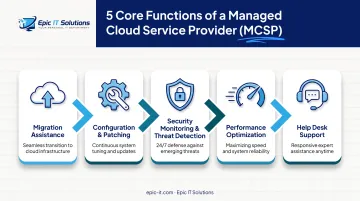
According to IBM, that management can be complete or partial. In practice, an MCSP typically handles:
- Migration assistance when moving files, email, or applications to the cloud
- Ongoing configuration and patching of systems
- Security monitoring and threat detection
- Performance optimization for hosted apps and servers
- Help desk support when something breaks
Management doesn't have to be all-or-nothing. Some businesses hand over their entire cloud environment. Others keep internal staff and only outsource specific functions, like backups or security monitoring. This partial approach is often called co-managed IT, and it's increasingly common among growing businesses that have some IT capability but not enough bandwidth for everything.
Most managed service arrangements are governed by a Service Level Agreement (SLA). According to TechTarget, a solid SLA spells out included services, response times, performance metrics, and who's responsible for what. If a provider can't clearly explain their SLA, treat that as a warning sign before you sign.
Self-Managed Cloud vs. Managed Cloud Services
| Self-managed cloud | Managed cloud services | |
|---|---|---|
| Who runs day-to-day ops | Your internal team | An MCSP |
| Best fit | Dedicated IT staff with bandwidth | SMBs without a full-time IT department |
| You still own | Strategy, vendors, and outcomes | Strategy and business priorities |
| Provider owns | — | Monitoring, patching, security, support |
Self-managed cloud means your business owns every piece: setup, security patches, troubleshooting, the works. That's fine if you have dedicated IT staff with time and expertise.
Most small businesses don't. There's no IT department—just an office manager who also handles payroll and, apparently, server maintenance. Managed services shift that burden to people whose full-time job is keeping cloud systems healthy.
Types of Cloud Managed Services
Managed services generally mirror standard cloud categories of infrastructure (IaaS), platforms (PaaS), and software (SaaS), but add a layer of active management on top. Here's how that breaks down in practice.
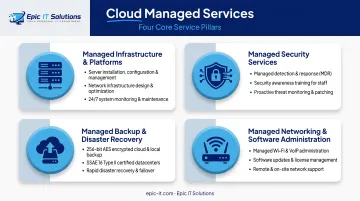
Managed Cloud Infrastructure & Platforms
This covers servers, virtual machines, storage, and hosting environments. A provider handles patching, uptime monitoring, and upgrades so your systems don't quietly fall behind.
Epic IT Solutions, for example, installs and manages centralized business servers for file sharing, backup, and network support. It also supports full VMware and Hyper-V environments with image backup and recovery.
Full VM images can be restored to a client's own host or to Epic's site if needed.
Managed Security Services
Threat monitoring, access controls, and compliance support fall here, particularly relevant for law firms and other regulated businesses handling sensitive client data.
This typically includes:
- 24/7 managed detection and response (MDR)
- Spam filtering and phishing simulation
- Secure remote access controls
- Security awareness training for staff
Epic IT provides all of the above, plus Managed Microsoft 365 Protection to secure cloud productivity tools specifically.
Managed Backup & Disaster Recovery
Automated backups and recovery planning prevent data loss from outages, ransomware, or simple human error. Coverage should extend beyond files to email systems, databases, and full server images.
Epic IT's backup service, for instance, covers files, Exchange, SQL, and Windows System State data, plus full VMware and Hyper-V images.
Data gets 256-bit AES encryption, SSL transmission, and storage across two SSAE 16 Type II-compliant datacenters with biometric security and HIPAA- and FINRA-compliant encryption standards.
Managed Networking & Cloud Software Administration
This covers the tools your team actually touches daily: Microsoft 365, hosted line-of-business apps, and the network connecting multiple offices. Administration includes user setup, license management, and Wi-Fi configuration across locations.
Epic IT manages Microsoft 365 administration, managed Wi-Fi, and multi-location network support for SMBs that need those day-to-day tools kept current without an in-house IT team.
Benefits of Cloud Managed Services for Small Businesses
Small businesses without full-time IT staff get enterprise-level capability without the overhead. Benefits include:
- Converts unpredictable admin costs into a fixed monthly fee—the median U.S. network administrator salary was $96,800 in 2024, according to the Bureau of Labor Statistics, before benefits
- Delivers cybersecurity, cloud, and infrastructure expertise without multiple specialized hires
- Catches problems early with proactive monitoring and restores operations faster via 24/7 help desk support
- Strengthens security with encryption, compliant datacenter storage, and access controls for regulated clients such as law firms and life sciences companies
- Scales backup, storage, and server capacity when you add an office or server, without a six-month overhaul
- Frees your team to serve clients instead of troubleshooting printers and login issues
Who Needs Cloud Managed Services? Signs It's Time to Outsource
Not sure if you're a candidate? Run through this quick checklist:
- No dedicated IT staff on payroll
- Hours each week spent firefighting tech issues instead of real work
- IT costs are unpredictable, or climbing without explanation
- You're struggling to meet industry compliance requirements
If two or more of these sound familiar, it's probably time to outsource.
Cloud managed services show up most in a few specific situations:
- Owner-run businesses with zero internal IT support
- Multi-location operations juggling several server setups at once
- Regulated industries like legal and life sciences, where a data breach carries real consequences
The data backs this up. JumpCloud's 2024 SME IT Trends survey found that 76% of IT decision-makers used an MSP for at least some functions, and 42% relied on one to manage their entire IT environment. The most commonly outsourced functions were security (57%), cloud storage (52%), and system monitoring (51%).
It's not just businesses, either. Households and remote workers benefit from managed support for personal cloud storage, backup setup, and home network security—especially when you need a secure connection back to the office.
How to Choose the Right Cloud Managed Services Provider
Picking a cloud managed services provider isn't just about price. A few factors matter more than most people realize.
Local presence and response capability. A provider offering both remote and on-site support resolves problems faster than one that's purely remote. When a server goes down at 4 p.m. on a Friday, having someone who can physically show up matters.
Breadth of services. Juggling separate vendors for security, backup, and computer repair creates gaps. A provider covering security, backup, consulting, and hardware support under one roof simplifies accountability.
Epic IT Solutions shows how that model works in practice. Based in Gainesville and serving North Central Florida, Greater Orlando, Tampa Bay, and Jacksonville, it acts as an outsourced IT department for small businesses and households.

Founded in 2015 with 20+ years of combined IT experience, the team pairs on-site visits with secure remote sessions across managed IT, cybersecurity, encrypted backup, and computer repair. Co-managed options are available when you already have internal IT staff but need help on projects, security, or infrastructure.
Ask about SLA terms. Before signing anything, ask potential providers:
- What response times are guaranteed for critical issues versus routine requests?
- What's explicitly covered, and what remains your responsibility?
- Is support available outside standard business hours?
A provider who can't answer these clearly probably hasn't thought them through either.
Frequently Asked Questions
What are examples of cloud computing services?
Common examples include cloud email and productivity suites like Microsoft 365, cloud storage and backup, hosted virtual servers, and cloud accounting tools like QuickBooks Online.
What's the difference between cloud computing and cloud managed services?
Cloud computing is the underlying technology—storage, servers, and software—delivered over the internet. Cloud managed services refer to outsourcing the ongoing setup, security, and maintenance of that technology to a provider.
Can a small business just manage its own cloud services instead of hiring a provider?
Yes, if you have dedicated in-house expertise and time. Most small businesses lack the staff to handle security, backups, and troubleshooting effectively on their own.
How much do cloud managed services typically cost for a small business?
Pricing is usually subscription or scope-based, generally far less than a full-time IT employee's salary and benefits. Exact costs vary depending on network complexity, business size, and the specific services included.
What's the difference between fully managed and co-managed cloud services?
Fully managed means the provider handles everything: setup, security, monitoring, and support. Co-managed means the provider supplements an existing in-house IT team, which works well for growing businesses.
If I use a managed cloud provider, do I still need any in-house IT staff?
Many small businesses don't need any in-house IT staff at all with a full-service provider. Larger or multi-location businesses may keep a small internal team supplemented by co-managed support.